
DATEV data formats: The destination picks the format, not you
The common assumption about DATEV's formats is that CSV and XML are two ways to send the same data. They are not. Each of the three documented formats belongs to a different destination, and the third one is not an accounting format at all. Which one you generate follows from where the payload is going.

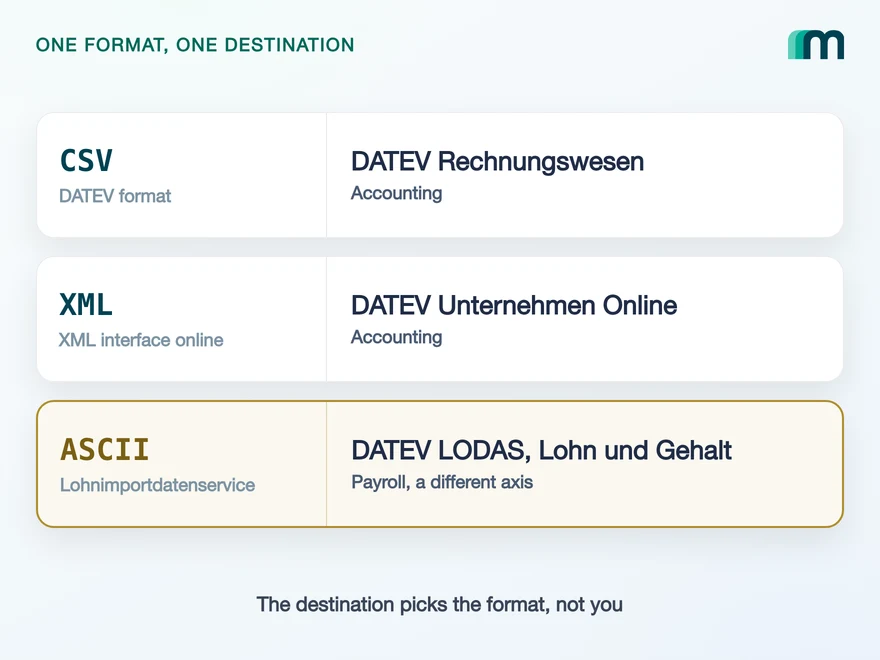
Three documented formats, and what each one is for
DATEV publishes three file formats with their own specifications, and the common assumption about them is wrong in a specific way. They are not three ways to send the same data. Each one belongs to a different destination, and the destination is what selects it.
| Format | Destination | Carries |
|---|---|---|
| DATEV format, CSV | DATEV Rechnungswesen | Posting records and master data |
| DATEV XML interface online | DATEV Unternehmen Online | Invoice and cash data |
| ASCII | DATEV LODAS, Lohn und Gehalt | Payroll master and current data |
CSV
DATEV format
DATEV Rechnungswesen
Posting records and master data
XML
XML interface online
DATEV Unternehmen Online
Invoice and cash data
ASCII
ASCII
DATEV LODAS, Lohn und Gehalt
Payroll master and current data
The third row is a different axis. It serves DATEV’s payroll applications through its own service, so a bookkeeping integration never generates it.
Read the middle column and the practical consequence appears. Choosing a format is the same decision as choosing a DATEV product, which means it is already made by the time you get to the file: what your product produces decides the target, and the target decides the format.
Which product a payload belongs to is the subject of the comparison between Unternehmen Online and Rechnungswesen, and it answers the format question as a side effect.
The three formats and their destinations from DATEV’s own file interface index, retrieved and quoted verbatim on 18 August 2026. The index describes the CSV interface as importing into Rechnungswesen and the XML interface as importing invoice and cash data into Unternehmen online.
What the DATEV format actually looks like
It is the file the DATEV Rechnungswesen API takes: a CSV with a fixed file name prefix, EXTF_, and a three-part structure that catches most teams once. Line one is a header carrying the metadata DATEV needs to process the file. Line two is the header line for the user data. The records start on line three.
That first line is the trap, because it looks like a column row and is not one. Reading it as column names gives you DATEV’s processing metadata instead of the fields, and the mistake surfaces after the upload rather than during it.
"EXTF";700;21;"Buchungsstapel";13;20240130140440439;;"RE";… (31 fields)Umsatz (ohne Soll/Haben-Kz);Soll/Haben-Kennzeichen;WKZ Umsatz;… (125 columns)100,18;"S";"";;;"";48400;8401;"";3101;… (the first record)
Structure and the sample file from DATEV’s format description, checked 18 August 2026. The field counts are counted from that sample rather than estimated.
The posting batch layout is 125 columns wide, and 56 of them are the numbered pairs DATEV reserves for extra information: 40 columns of Zusatzinformation and 16 of Beleginfo. The rest is the booking itself, from Umsatz and Soll/Haben-Kennzeichen through Konto, Gegenkonto and BU-Schlüssel to Festschreibung.
Four encoding rules decide whether a correct booking is read correctly, and all four are easy to get wrong from a language whose defaults differ. Fields are separated by semicolons, every line ends with CR/LF, text fields are wrapped in quotation marks and a quotation mark inside one is doubled.
The number formatting is the one that produces silent damage. The decimal separator is a comma, and thousands separators are generally not used. A locale-formatted amount does not fail loudly here, it books a different number.
The header of a DATEV format file can be validated: DATEV offers a check for that metadata line. The body cannot. No schema describes the 125 columns of a posting batch, so correctness there is decided by the receiving side, and you learn about a mistake from the job result rather than from a validator.
That is the practical difference to the XML route, where a schema covers the whole document and DATEV publishes a checking tool for it. A CSV mistake is the expensive one because it surfaces late.
File name prefix, the three-line structure, the separator, the line ending, the quoting rule and the number formatting are quoted from DATEV’s format description, checked 18 August 2026. The seven documented record layouts of the format are Header, Booking batch, Recurring bookings, Debitors and Kreditors, Terms of payment, G/L account description and Various addresses.
Where the XML route differs, and what validation buys you
The XML interface online is UTF-8 encoded and carries invoice and cash data into the DATEV Unternehmen Online API. Structurally it is the opposite of the CSV route: hierarchical rather than flat, and validated against a schema rather than accepted on trust.
That validation is the trade. It is work up front, because a document has to satisfy DATEV’s schema before it goes anywhere, and it is the reason an XML mistake is cheaper: it fails in your pipeline instead of in your customer’s books.
There is a second layer to it that is easy to miss when reading the requirements, and it is literal: DATEV publishes two sets of interface requirements per data service, one for the service and one for the file format. The Buchungsdatenservice has its own plus one for the DATEV format; the Rechnungsdatenservice 1.0 has its own plus one for the DXSO format. Meeting the first does not mean you have met the second, which is why the format is a subject in this ecosystem rather than a field on a request.
Encoding and purpose of the XML interface from DATEV’s file interface index, checked 18 August 2026. The two separate sets of requirements per service from DATEV’s Schnittstellenvorgaben Cloud Integration, section Datenservices Rechnungswesen, checked 17 August 2026.
Why the third format belongs to payroll
ASCII is the format of DATEV’s Lohnimportdatenservice. An ASCII import file carries payroll master data or current data from an external system to the DATEV data centre, where it is retrieved into DATEV LODAS or DATEV Lohn und Gehalt.
So it sits on a different axis from the other two. CSV and XML deliver bookkeeping data to bookkeeping applications; ASCII delivers payroll data to payroll applications, through its own service and its own scope, hr:files.
For a bookkeeping integration that makes it the format you do not need, and knowing so early saves a detour. It also means a payroll feature is a different project rather than a variant of an accounting one, with a different service, a different destination and its own approval.
Two layers here rather than one, because the honest answer includes a limit on our side: Maesn’s data model covers accounting objects and carries no payroll objects today, so the ASCII route is outside what you can reach through this interface.
Service, format and destinations from DATEV’s hr:files product page, retrieved on 18 August 2026: ASCII import files are transferred to the DATEV data centre and imported into the payroll systems LODAS or Lohn und Gehalt. The absence of payroll objects on our side is counted from our own coverage data.
Both accounting formats travel as jobs
Neither file is posted to an endpoint that answers with a result. Both go through a job, and the job has four steps: you create it with the file, you start it, you poll its status and you evaluate what it returns.
The service names follow the format. The XML route runs as a DXSO job on accounting:dxso-jobs, the Rechnungsdatenservice 1.0. The CSV route runs as an EXTF job on accounting:extf-files, the Buchungsdatenservice.
Three consequences follow, and they are design decisions rather than details. There is no immediate answer, so your interface needs a pending state. The outcome can be partial, so a job that succeeded is not the same as every record inside it succeeding. And the failure detail lives in the job result, so your logging has to keep the job reference next to the document it belongs to.
Through Maesn none of that is your loop. You post the common data model, and the file generation, the encoding rules and the job are handled on our side, which is also why asynchronous processing exists as its own subject: the queueing is the product of the systems behind it rather than of our interface.
The four job steps and the two service names from DATEV’s interface requirements and product pages for accounting:dxso-jobs and accounting:extf-files, checked 17 August 2026.
Which format your use case lands on
The decision follows the destination, and the destination follows what your product produces. Read the table by the first column.
| What you send | Destination | Format |
|---|---|---|
| A finished, reconciled booking | Rechnungswesen | DATEV format, CSV |
| An invoice for the advisor to review | Unternehmen Online | XML |
| A document image only | Unternehmen Online | The document itself |
| Payroll master or current data | LODAS, Lohn und Gehalt | ASCII |
| A read of the finalised books | Out of Rechnungswesen | No file at all |
The last row is the one the format question usually forgets. Reading does not involve any of the three formats: it runs through the export service, and what it returns is data rather than a file. The guide to the DATEV Datenservice Export Rechnungswesen covers what that means for freshness, and the Rechnungswesen integration guide covers the two connections behind it.
What Maesn covers, and what stays with you
Three things stop being yours:
- The file. Generating a 125-column CSV with the right prefix, separator, line ending, quoting and decimal comma, or a schema-valid XML document, happens here.
- The job. Creating it, starting it, polling it and reading the result is one interface rather than two shapes for two formats.
- The service mapping. Which data service a payload travels through is derived from what you post rather than chosen by you.
Two things do not move:
- What the destination accepts. A booking that violates an accounting rule is refused whatever generated the file, and no abstraction can make a destination accept something it rejects.
- Payroll. The ASCII route serves a different family of DATEV applications and is not part of the accounting object model, so it stays a separate project.
What is absorbed on our side is described in our own DATEV documentation. The limits above are stated as limits rather than as roadmap.
Frequently asked questions
Do I get to choose between CSV and XML in DATEV?
What is the DATEV format?
What is the ASCII format in DATEV?
What are dxso-jobs and EXTF-jobs?
Why can a DATEV CSV not be validated before upload?
Which number format does a DATEV CSV use?
Does a unified API remove the DATEV formats entirely?
How to Integrate with Tripletex: One Session Token to Send
Tripletex combines two tokens into a third, puts the company in the username field and numbers new journal lines by row. What that means when you build.
Lennart Svensson · 24 Sept 2026
How to Integrate with Procountor: Run It Unattended
Procountor has two ways in, and the unattended one stops at every endpoint that asks for a second factor. What that means for tokens, syncing and tax mapping.
Lennart Svensson · 28 Aug 2026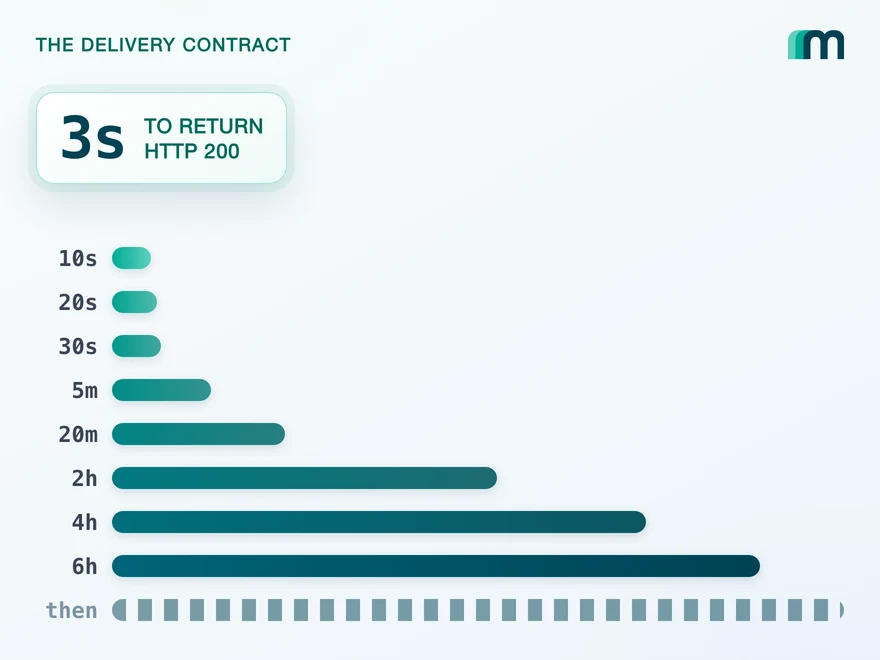
QuickBooks Online Webhooks: Events, Retries and Recovery
QuickBooks Online webhooks cover 29 entity types and expect HTTP 200 in three seconds. Why Intuit still asks you to poll change data capture.
Lennart Svensson · 25 Aug 2026Build once on the Unified API.
Three formats, two job shapes and one set of encoding rules is a week of work you do not get back, for one country's accounting standard. Post one data model instead and the file, the job and the service mapping stop being yours, on DATEV and on every other connected system.