Lexware Office API Integration
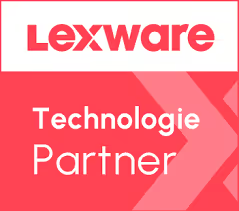
Lexware Office, formerly lexoffice, is one of the most widely used cloud accounting platforms among German SMBs, freelancers and accounting firms. It covers invoicing, expense tracking, contacts and tax reporting. Connect it through Maesn and you reach it with the same REST API and the same data model as every other supported system.












A Lexware Office integration in days
Lexware Office is not hard to integrate, it is specific. Three of those specifics normally land on your engineers. Here is what they are, and what Maesn takes off the table.
The qualification runs with us
The public API needs your customer on the XL plan, and going beyond it means qualifying with Lexware directly. Maesn is an official Technology Partner and goes through that with you.
Revocation arrives as an event
Lexware Office fires a dedicated token event when a user revokes access or a token cannot be refreshed. Maesn forwards it like any other event, so you react to a lost connection instead of finding out through failing calls.
Created and normalised for you
Webhooks are not registered once for your app, they are set up for each connected customer. Maesn creates those subscriptions and normalises the payloads to the same shape as every other system.
What is left on your side is one REST call against a data model you implement once. Teams go live in days rather than spending a quarter on a single system.
A short call is usually enough to tell whether Maesn fits your use case.
Clockin turned integrations into a growth channel
Clockin digitises time tracking for small and mid-sized businesses. Their integrations stopped being a support cost.
“We use Maesn to successfully leverage integrations and partnerships as a key driver for lead generation and expansion into new markets and customer segments.”


Three reasons to reach the Lexware Office API through Maesn
Connecting Lexware Office directly is a project you can finish. Owning it, and then the next system, is the part that decides your roadmap.
A partner, not a scraper
Maesn is an official Lexware Technology Partner. That is what opens the deeper access and the marketplace listings, neither of which you can reach by reverse-engineering a public API.
The objects your use case needs, switched on
Invoices, contacts, vouchers and the rest arrive through one interface, and anything not enabled yet is switched on when a use case calls for it. Tell us which objects your product works with and we confirm them per system.
The next system costs nothing
Once Lexware Office runs, every other supported accounting and ERP system answers on the same interface. Your second integration is a configuration step.
Two ways to reach Lexware customers, one integration
Most providers stop at the API. Maesn does the technical enablement and the relationship, because on a system like Lexware Office the second one decides how far the first one gets you.
Technical enablement
One integration against the Unified API and one data model, identical to every other system Maesn supports. Your engineers meet the same interface here as they will for the next system.
Partnership support
Maesn is an official Lexware Technology Partner. We run the qualification, join the onboarding and help you build a real relationship with Lexware, the same way we do for every other system we enable.
Without a partnership
Your integration works and your customers connect it themselves with an API key. Creating that key requires them to be on the XL plan, so their subscription decides whether they can connect at all.
With a partnership
Your product is listed in two places at once, on the Lexware website as a partner and inside Lexware Office under Erweiterungen. Your customers connect through a different authentication route, so the plan requirement falls away and every Lexware customer can connect.
The listing runs under your brand, not Maesn's. Your name is what the customer sees when they connect.
Maesn runs the qualification with Lexware alongside your integration.
Different methods on the Lexware side, one implementation
Lexware Office supports more than one authentication method, and which one applies depends on the use case and on your relationship with Lexware. The route open to everyone is the public API, authenticated with an API key, and there are two ways to collect it.
- API key
- Public API
- Further methods
- Within a partnership
Maesn unifies both, so your implementation does not change with the method your customers end up on.
- Maesn Connect
- A branded popup in your own look and feel. Your customer pastes the key and the connection is live.
- Headless
- Build the input yourself and submit the key through the create account endpoint. Fully programmatic.
Beyond the public API, further methods exist within a Lexware partnership. Maesn is an official Lexware Technology Partner and runs that process with you.
- 1
Your customer retrieves the key
In Lexware Office, an administrator opens the public API add-on page and copies the key. It belongs to that one account, so each of your customers goes through this once for their own environment.
- 2
The key reaches Maesn
Whichever of the two ways you chose, Maesn Connect or headless, the key lands with Maesn and is validated on submit. An invalid key fails there rather than later in production.
- 3
You work with one account key
Maesn stores the connection and returns an account key. From there every request carries your API key plus that account key, the same two headers you already send for every other system in the catalogue.
Every system in the catalogue authenticates differently, from API keys through OAuth to database credentials and multi-company flows. Unified authentication is what keeps that difference off your side of the integration: you implement one flow and Maesn resolves what each system demands behind it.
Native Lexware webhooks, with normalised payloads
Lexware Office supports native webhooks, so changes reach you as events rather than through polling. Maesn creates the subscriptions per connected customer and normalises the payloads, so the shape you handle is identical to every other system you integrate.
The token resource is the one worth building against deliberately: Lexware Office fires it when a user revokes API access or when a token can no longer be refreshed. Maesn forwards that event, so your product can react to a lost connection instead of discovering it through failing calls.
Not every accounting system offers webhooks, and several offer none at all. Maesn closes that gap with one event model across the whole catalogue, so the handler you build for Lexware Office keeps working for a system that needs polling underneath.
Page sizes that change per endpoint, one convention
Lexware Office applies its paging rules inconsistently, and the inconsistent part is the one it does not document. Maesn harmonises it, so one page size works everywhere.
Lexware sets the ceiling per endpoint
The parameter is size, the default page is 25 and the maximum is 100 or 250 depending on which endpoint you call. Five endpoints are documented for the higher ceiling.
Items rejects anything below 25
A page size under that floor is answered with a 406, so the read fails rather than degrading. No minimum is documented for any endpoint, which is why you meet this one by hitting it.
Through Maesn you send one page size out of five documented values, 5, 10, 20, 50 or 100, and one page number that always starts at 1. That is our unified pagination and filtering feature: it harmonises the paging contract of every connected system into a single request shape, so an inconsistency in one vendor’s API never reaches your code.
Lexware Office pagination walks through both sides of that contract, the documented values on each side and the status code a rejected page size arrives under.
What Lexware Office requires up front
Lexware Office puts three conditions in front of an integration, and all of them are easier to plan for than to discover halfway through a build.
- The public API needs the XL plan
- Your customer's Lexware Office subscription has to be on the XL plan for the public API to be available. A Lexware partnership removes that requirement for your users, which is covered further down this page.
- Deeper access is granted by Lexware
- Lexware opens further access through a bilateral qualification with their partner team, and that also changes how your customers authenticate. Maesn is an official Lexware Technology Partner and runs that process with you.
- An account with administrator permissions
- The API key is created inside Lexware Office, so the connecting user needs administrator rights on the account.
We walk through the plan and access conditions with you.
One shape for Lexware Office and for everything next to it
What you read here arrives in the same shape as what you read anywhere else Maesn connects, which is what makes the second integration cheap.
Whatever you read comes back in the shared common data model, so an invoice from Lexware Office has the same shape as an invoice from any other supported system, and the code you write here is the code you reuse for the next one.
What Maesn reaches on this system covers both routes into Lexware Office, not only the one your customers can open themselves. Tell us which objects your use case works with and we confirm them for the route your customers are on.
Tell us which objects your use case needs and we will confirm what is possible.