
Pagination in Lexware Office: Maesn turns the per-endpoint rules into one page size
Lexware Office defines the maximum page size per endpoint, documents no minimum and answers a rejected one with a 406, the same code it uses for an unsupported media type. Through the unified endpoint the ceiling and the counter stop being yours to remember.

Lexware Office page sizes change with the endpoint
Lexware Office applies its paging rules inconsistently, and the inconsistent part is the one it does not document. It documents one default and a set of maxima: the default is 25 entries per page, the ceiling is 100 or 250 depending on which endpoint you call, the parameter is called size and five endpoints are named for the higher ceiling.
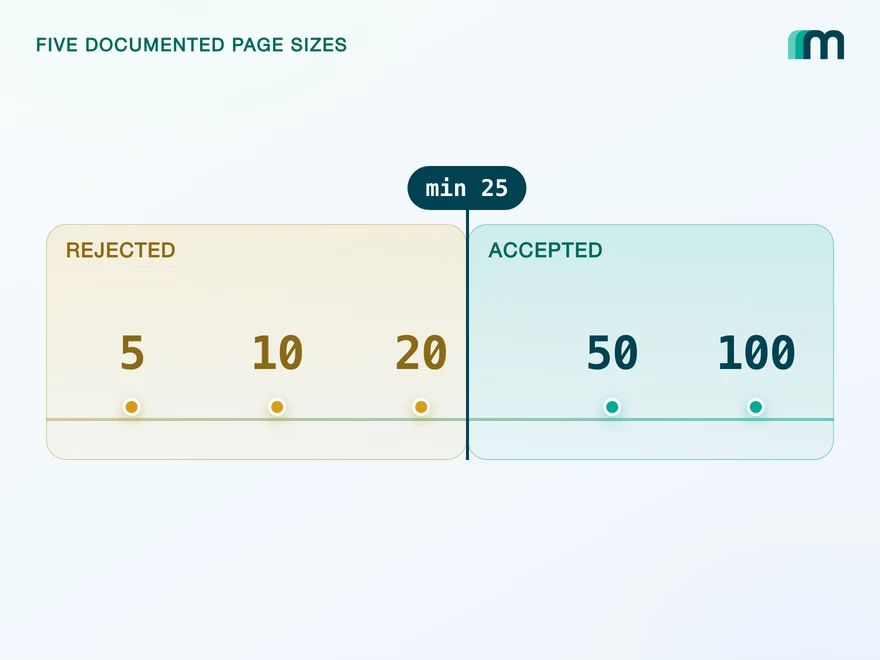
What the reference does not document, for any endpoint, is a minimum. That matters because there is one. Called directly, the Lexware endpoint behind our Items object answers a page size below 25 with a 406, so the read fails and no smaller page comes back. You find the floor by hitting it.
51020
Below the floor Lexware sets behind Items
Called directly, Lexware answers a page size this small with 406
50100
Above the floor
Lexware accepts a page size this large
Lexware Office documents a default page size of 25 and a maximum per endpoint. It documents no minimum, so the floor only shows when a request falls below it.
limit and takes five documented values. Three of them are below 25, and behind our Items object Lexware Office answers a page size below 25 with a 406, a status code that does not mention page size. Maesn harmonises the difference, so the standard page sizes work everywhere.The documented ceiling and the undocumented floor are both on the Lexware Office API page. Items is an object of maesn’s shared data model, which is worth knowing before you go looking for an endpoint of that name in Lexware’s reference.
Default, maximum and parameter names from Lexware’s paging documentation, retrieved 17 November 2026: “Default page size is set to 25 but can be increased up to 100/250 (depends on the used endpoint, see table below)”. The table there names articles, contacts, recurring-templates, voucherlist and vouchers for 250.
The floor of 25 behind Items and the 406 are not from that reference. They are a first-hand report from our own integration work. No minimum page size appears anywhere in Lexware’s published paging rules, which is what makes the floor worth writing down.
A rejected Lexware Office page size returns 406
The status code is where the time goes. Lexware’s own table gives 406 two jobs: validation issues due to invalid data, and on file resources a requested media type that is not supported. Both meanings are documented on the same page.
The specification defines the code for one of those. RFC 9110 says a 406 means the target resource has no representation acceptable to the user agent according to the proactive negotiation header fields in the request. A client written against that inspects Accept and finds nothing wrong with it.
So on a direct call the status line misleads. A handler keyed on the code alone reports a content negotiation problem for a query parameter, and a retry does not help, because nothing about the request would change. On our side, errors end up in unified error handling: one error shape, whatever the system underneath called it.
In Lexware Office
Validation issues due to invalid data
On file resources, an unsupported media type
In RFC 9110
No representation acceptable to the user agent, by content negotiation
A handler that reads the status line alone cannot tell the two apart. The distinguishing detail is in the body: Lexware’s documented error response carries a message and a details list naming the field and the violation.
Lexware’s status code table describes 406 as “Validation issues due to invalid data” and adds the media type meaning for file resources. The normative definition is RFC 9110 section 15.5.7, which frames the code entirely in terms of proactive content negotiation. Retrieved 17 November 2026.
The same reference shows which reading a regular error response carries. Its worked example is a 406 with the message “Validation failed for request. Please see details list for specific causes” and a details list naming the field and the violation. A content negotiation failure would not have a field.
Maesn harmonises Lexware Office pagination into one page size
Through the unified endpoint you send limit and page. The five values above are the documented set, the page counter starts at 1 and your request is translated behind the endpoint into what each system underneath expects.
That is two normalisations, and both are the kind you would otherwise write per system. The page size becomes one set of values instead of a per-endpoint ceiling you have to look up. The page number becomes one origin instead of an off-by-one that depends on whose documentation you read last.
Both belong to one feature. Ours is called unified pagination and filtering, and it harmonises the paging contract of every connected system into a single request shape, so an inconsistency in one vendor’s API stops being something your client has to know about.
What you save grows with every system you connect. A single per-endpoint exception is cheap to write. Keeping track of them across a catalogue of 30+ systems is not, when each system brings paging rules of its own.
Here page size and page number are normalised once, on our side, and your read loop stops carrying a table of special cases.
| Unified endpoint | Lexware Office | |
|---|---|---|
| Page size parameter | limit | size |
| Documented values | 5, 10, 20, 50 or 100 | Default 25, maximum 100 or 250 by endpoint |
| First page | page=1 | page=0 |
const response = await axios.get(url, {params: {limit: 50,page: 1,},headers: {"X-API-KEY": apiKey,"X-ACCOUNT-KEY": accountKey,},});
Parameter names and the accepted values from our own filtering, ordering and pagination reference.
Two things stay with you, and both are worth planning for. Paging turns one read into a series of calls against the target system’s rate limit, and maesn adds no limit of its own on the way in, so on a synchronous call the system’s limit is the one that can be exhausted. The loop itself, when to run it and what to do with a rejection, stays yours to write.
Lexware Office has two other structural rules, and both decide an architecture before the first read: how often you may call at all, and the fresh read every update needs. Those are the subject of how to integrate with Lexware Office.
limit, page and the accepted values from our own reference. Lexware documents its counter in the paging section: “Pages are zero indexed, thus providing 0 for page will return the first page.” That maesn adds no rate limit of its own is our documented behaviour, and it is the reason the target system’s limit is the one you plan against. Retrieved 17 November 2026.
Frequently asked questions
Does the page counter start at 0 or at 1?
How do I tell a page size rejection from a media type rejection?
Does the 10.000 in totalElements cap what I can read?
Do I still have to respect the rate limit while paging?
Which Lexware Office endpoints allow a page size of 250?
Does sorting change how paging behaves?

State of Accounting API Connectivity 2027: Data on 31 Systems
How 31 accounting and ERP systems handle API access: OAuth, credential lifetimes, revocation, webhooks and ledger data. Collected in October and November 2026.
Lennart Svensson · 24 Nov 2026
Lexware Office Partnership Guide: Public API or Partner Route
The Lexware Office Public API runs on an API key from the XL plan. Reaching every plan takes a technology partnership. How Lexware's qualification works.
 Dr. Themo Voswinckel · 24 Nov 2026
Chart of Accounts Mapping: Cover Every ERP Customisation
Map each object in your platform to the right account, tax code, dimension and company code in your customer's ERP. Standard and custom configuration in one step.
Dr. Themo Voswinckel · 2 Nov 2026Build once on the Unified API.
A page size that is legal on one endpoint and a validation error on the next is the kind of detail you find by hitting it, once per system, for as many systems as you connect. Send one request shape instead and the exception stops being yours to remember.