
QuickBooks Online webhooks: Maesn turns the CloudEvents envelope into one event body
Intuit documents 29 entity types, a three-second acknowledgement window and a retry ladder that stops sending until you answer. It also tells you to poll change data capture, because a webhook feed on its own is not a complete record.

Which QuickBooks Online entities send webhooks
QuickBooks Online publishes webhooks for 29 entity types, and it does not publish the same operations for all of them. The table in Intuit’s configuration guide has six columns, and each entity ticks only the ones that apply to it.
Update is the only operation that reaches every documented entity. Create reaches all of them except Preferences, which can be changed but not created. Delete stops at the transactions and name lists that can be removed at all.
The remaining three are narrower by nature rather than by policy. Merge exists on name-list entities such as Customer, Vendor and Item. Void exists on transactions that can be voided instead of deleted. Emailed exists on documents you send to someone.
Which of those you actually receive is a separate question from which exist, because you select the events per app in the developer dashboard. The full matrix of what a connected company can send lives on the QuickBooks API page, alongside the objects the unified model exposes.
Entity and operation table from Intuit’s webhook configuration guide, retrieved 25 August 2026. The six documented operations are Create, Update, Delete, Merge, Void and Emailed. The counts here are ours, taken by reading that table row by row.
What a QuickBooks Online webhook payload contains
A notification arrives as a JSON array of CloudEvents envelopes. Each envelope describes one change: the specification version, an event id, the source, an event type, a timestamp, the entity id in intuitentityid and the company in intuitaccountid.
The event type carries the entity and the operation in one string, in the form qbo.customer.merged.v1 or qbo.salesreceipt.updated.v1. That string is where your routing decision comes from, rather than a nested entities array.
[{"specversion": "1.0","id": "…-Customer-123","source": "intuit.…","type": "qbo.customer.merged.v1","datacontenttype": "application/json","time": "2025-12-04T15:25:05Z","intuitentityid": "123","intuitaccountid": "93414556…","data": {"deletedid": "27"}}]
Field names and structure from Intuit’s data object reference, retrieved 25 August 2026. Identifiers are shortened here, they are masked in the source.
deletedid, a created employee returns an alternative_ids array, and an updated sales receipt carries no data object at all. A parser that reaches into data without checking finds nothing on the third case.What no envelope contains is the record itself. You learn that customer 123 was merged, not what the surviving customer now looks like, so every event that matters becomes an event plus a read. That second call is the subject of how to integrate with QuickBooks.
Intuit’s own wording on the same reference, retrieved 25 August 2026: “The data object within QuickBooks Online webhook response payloads is not the same for all cases. Depending on the event type, entity, and operation, the structure and contents of this object can vary.”
The QuickBooks Online webhook delivery contract
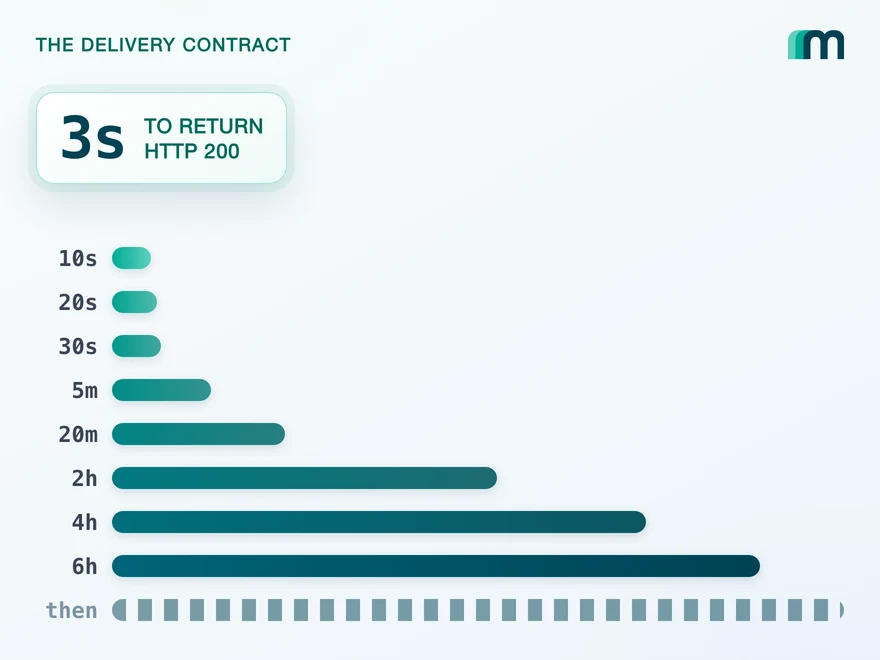
Your endpoint has to return HTTP 200 within three seconds. That window is measured on the acknowledgement rather than on your processing, which is why Intuit asks you to queue the payload and do the work on another thread.
Miss it, and the event is retried on a fixed sequence: 10 seconds, 20, 30, then 5 minutes, 20 minutes, 2 hours, 4 hours, 6 hours, and every 6 hours from there. The ladder is generous at the top and slow at the bottom.
3s
To return HTTP 200
Measured on the acknowledgement, not on your processing
10s20s30s5m20m2h4h6hthen every 6h
The retry sequence after a missed acknowledgement
Later events may wait behind the one you have not answered
The part that decides an architecture is what happens meanwhile. Intuit states that you may not receive subsequent events until the first one is acknowledged correctly, so a handler that is slow on one event is not slow on one event. It is stalled on the queue behind it.
Ordering is not guaranteed either. Events can arrive out of sequence, and Intuit names the timestamp in the payload as the source of truth for when a change actually happened. A handler that trusts arrival order will apply an older change over a newer one.
| QuickBooks Online | |
|---|---|
| Acknowledgement | HTTP 200 within 3 seconds |
| On no acknowledgement | 10s, 20s, 30s, 5m, 20m, 2h, 4h, 6h, then every 6h |
| While unacknowledged | Later events may not be delivered |
| Ordering | Not guaranteed, the payload timestamp decides |
| Scope per notification | One company at a time |
All five rows from Intuit’s webhook best practices, retrieved 25 August 2026, including the sentences “Your endpoint must respond to notifications with an HTTP 200 status within 3 seconds” and “Event notifications are sent one realm ID at a time.”
Change data capture is the recovery path for missed events
Intuit does not present webhooks as a complete record, and the clearest evidence is its own first best practice. To compensate for the possibility of missed events, it asks you to make a change data capture call for every entity you care about.
The call is a polling operation. You name the entities and a look-back date, and the response carries the full payload of everything that changed since then, with deleted records marked by a status field rather than omitted.
GET https://quickbooks.api.intuit.com/v3/company/<realmId>/cdc?entities=estimate,customer&changedSince=2026-08-24T10:00:00-07:00
Request shape from Intuit’s change data capture reference, retrieved 25 August 2026. The look-back date must fall within the last 30 days.
Two documented limits decide how much of a safety net that is. Changes are tracked for 30 days, so an outage longer than that is outside what the call can recover. And a response returns at most 1.000 objects, which is why Intuit suggests querying shorter periods.
So a QuickBooks integration that wants to be correct runs two mechanisms rather than one: a listener for the events, and a poller that goes back over the same ground to find what the listener did not get. Both have to be built, monitored and reasoned about together.
Intuit’s wording on best practices, retrieved 25 August 2026: “To compensate for the possibility of missed events, make a ChangeDataCapture (CDC) call for all required entities, dating back to the last known successfully processed webhook event for each entity.” The 30-day window and the 1.000-object maximum are documented on the change data capture reference.
Maesn turns QuickBooks Online webhooks into one event body
Through the unified endpoint you subscribe once and handle one event body. The envelope QuickBooks publishes is parsed on our side, and what reaches your handler is the same structure you already receive from every other connected system.
That is two normalisations rather than one, and both are the kind you would otherwise write per vendor. The payload becomes one shape instead of a per-vendor envelope whose optional blocks you have to learn. The signature becomes one check instead of a different scheme for each system.
{"eventType": "CREATED","resource": "INVOICE","resourceId": "bca91f06…"}
The event shape from our own QuickBooks documentation, which is the same body whether the system underneath pushes natively or is polled.
QuickBooks Online uses the app-based delivery model, where every connected company arrives at a single endpoint and each payload names its company. Systems built the other way subscribe per customer instead. Handling both of those models in one codebase is the work the unified endpoint removes.
Two things stay with you, and both are worth planning for. Deciding what a change means for your product is yours, and so is idempotency: networks retry, so key the work on the resource id and the event type rather than assuming each event arrives once.
What we do not do is run Intuit’s change data capture backfill on your behalf. Maesn polls the systems that publish nothing, and QuickBooks publishes. The recovery call in the section above stays a decision you make about your own tolerance for a missed event.
The event body, the single subscription and the one signature check are documented on our unified webhooks page, which also names QuickBooks Online as an app-based system. That we poll only where a system stays silent is the same page’s wording, and it is the reason the backfill above is named as yours rather than ours.
Frequently asked questions
Is the CloudEvents migration still something I have to plan for?
Do sandbox and production webhooks share one configuration?
Which entities does change data capture leave out?
How many objects can one change data capture response return?
Why does a merged customer event carry a deletedid?
Where do events for different QuickBooks companies arrive?
How to Integrate with Tripletex: One Session Token to Send
Tripletex combines two tokens into a third, puts the company in the username field and numbers new journal lines by row. What that means when you build.
Lennart Svensson · 24 Sept 2026
How to Integrate with Procountor: Run It Unattended
Procountor has two ways in, and the unattended one stops at every endpoint that asks for a second factor. What that means for tokens, syncing and tax mapping.
Lennart Svensson · 28 Aug 2026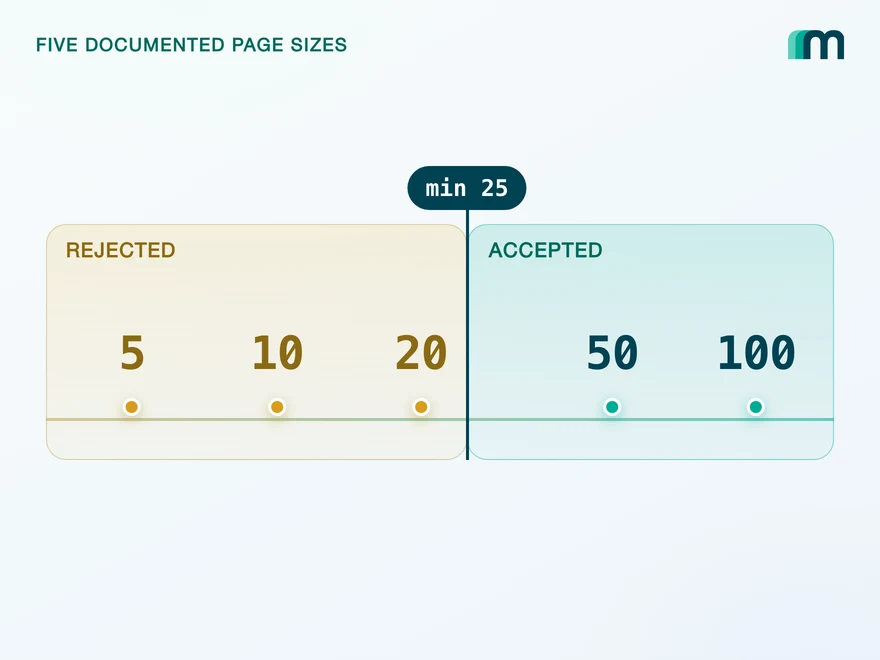
Lexware Office Pagination: The 406 and One Page Size
Lexware Office validates the page size and rejects a bad one with 406, the same code it uses for an unsupported media type. What that means for your read loop.
Lennart Svensson · 20 Aug 2026Build once on the Unified API.
A three-second acknowledgement, a retry ladder, an optional data block and a separate polling call to catch what the listener missed: that is one vendor's contract, and the next one you connect writes a different one. Handle a single event body instead and the contract stops being yours to track.