
The right mapping covers every accounting configuration and customisation
One step fits each customer's ERP setup, from the chart of accounts and tax codes to dimensions, project codes and company codes, onto a single data model, standard or custom.

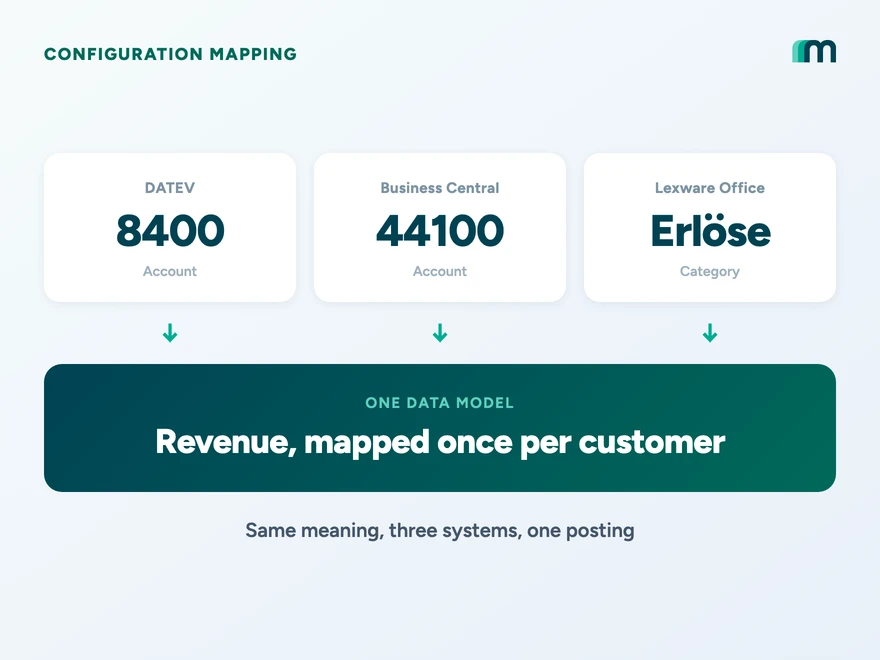
What you map to the data model
Every accounting integration setup starts with the configuration mapping. It connects each object in your platform to the matching configuration in your customer’s ERP or accounting system: the general ledger account, the tax code, the dimension, the project code and, in enterprise systems, the company code. The chart of accounts is the most visible of these configurations. Tax codes, dimensions, project codes, company codes and the fiscal year sit beside it, and all of them are mapped the same way.
The configuration is where your customers map their own company-specific requirements, in self-service or with your onboarding team, through one standardised method that follows the accounting domain. The company represents what is theirs, the same way every time, whichever system it runs.
Accounting gives you a high floor to build on. Double-entry bookkeeping makes the structure the same in every system, so the configuration that varies between companies is a known, bounded set: the accounts they post to, the tax codes and dimensions they use, the project codes and company codes they track, the fiscal year they run on and the fields they have added themselves. Map all of it onto one data model, standard or custom, and a long individual integration becomes one that scales.
Start with what sits in the mapping. Each operational category in your product needs a destination in the customer’s configuration, and the chart of accounts is only the first of them:
- a general ledger account from the chart of accounts, for the posting,
- a tax code for the VAT treatment,
- a dimension such as a cost centre, where the system carries one,
- a project code, where the system tracks work per project,
- a company code in enterprise systems like SAP, where one company runs several entities,
- the fiscal year the company books into.
Each of these is the same kind of object in DATEV, Business Central, SAP, Exact Online and Lexware Office, which is why a posting engine built once works across them. What differs is the value each company configures, and that value is theirs. So the mapping is stored per connection and not once for your whole platform.
| What you map | Example | Configured by |
|---|---|---|
| Revenue category | “Subscriptions” to the revenue account | The company |
| Expense category | “Travel” to the travel expense account | The company |
| Tax treatment | “Domestic 19%” to the matching tax code | The company |
| Dimension | “Sales team” to a cost centre | The company |
| Project code | “Implementation” to a project code | The company |
| Company code | “DE entity” to the SAP company code | The company |
- Revenue categorySubscriptions8400 · Sales revenue 19%Chosen from the live system
- Tax treatmentDomestic 19%DE · Output tax 19%Chosen from the live system
- DimensionSales teamCost centre, searchableChosen from the live system
- Company codeDE entity1000 · Germany entityChosen from the live system
- Custom fieldDelivery instructionExposed through raw dataNo code
- Custom objectOwn table in the systemRegistered as a dedicated endpointOne setup step
The standard objects and the two extension rows live in the same screen, so a customised system is mapped the same way as a stock one.
Two layers in one mapping step
Two kinds of content pass through the same mapping. The first is the standard model: the accounts, tax codes, dimensions and company codes every system exposes in a shared shape. The second is what a company has extended on its own, because enterprise systems like Business Central and SAP are built to be customised. A field added to an invoice, a dimension a company defined for itself, a whole table someone created.
Buyers ask, fairly, whether a unified integration only covers the first layer and tones the rest down until it no longer fits. It covers both in the same step, so the mapping does not care whether a value comes from the standard model or from something a company extended. The next section shows the two mechanisms that carry the second layer.
Raw data and dedicated endpoints
Configuration a company has added itself runs through the same mapping logic, by two mechanisms, and neither one becomes a separate project.
- Standard modelUnified endpoints
Accounts, tax codes, dimensions, company codes
- Extra fieldsRaw data
Everything the endpoint returns, beyond the model
- Own objectsDedicated endpoint
A table the company built, read through the same connection
The mapping step and the postings never see which path the value came from.
Both paths return the result in the same standardised shape, and that is the part that matters. A customised system then flows through the same mapping step and the same postings as a stock one. An integration built on these two mechanisms covers customised systems as readily as standard configurations, and still handles them in one standard form. For a software vendor weighing build against buy, that is what replaces the long individual integration project with something that scales. The detail sits on customisation handling and the common data model.
Why a chart cannot be mapped by name
The value a company picks cannot be read off its name, which is why the mapping has to carry the real choice instead of guessing it. A Business Central ledger can carry two accounts side by side that read almost the same: VAT Payable 19 and Revenue 19 VAT.
- 1800BankAsset
- 3806VAT Payable 19Tax / Liability
- 4400Sales revenueRevenue
- 8400Revenue 19 VATRevenue
A match on the words “revenue” and “19” can land on 3806 instead of 8400. One account books the VAT the company owes, the other books the sale. Pick the wrong one and both the VAT return and the profit-and-loss statement are wrong.
A chart of accounts is edited by people, and it shows. Custom accounts, near-duplicates, mixed languages and accounts left in place but switched off. Two accounts can read almost the same and behave differently, for example an account that calculates its own VAT next to one that does not. Label matching reads the name and not the behaviour, so it fails exactly here. The error could not find taxtype for invoice that teams hit in tools like sevdesk is what a broken mapping looks like from the outside.
So the mapping is a configuration the company owns, and Maesn carries it exactly, standard value or custom. The work splits cleanly:
- 01Maesn reads the structure
Accounts, tax rates, dimensions, company codes and contacts, read from the live system and returned in one model.
- 02Your product hosts the mapping
The onboarding screen where your categories meet the customer's values, standard or custom. You build it once.
- 03The company confirms its setup
It picks and confirms each value once. Maesn carries it from there.
This is why your platform does not need to know the account. It sends categories, the per-customer mapping resolves the value, and Maesn takes the accounting knowledge off your team, reading every chart, tax code, dimension and company code into one model, so no one on your side has to tell SKR03 from SKR04.
What Maesn reads on connection
On connection, Maesn reads the configuration and returns it in one model: the chart of accounts, the tax codes, the dimensions, the company codes and the fiscal year, plus the contacts. Machines do this well, and it is where one data model earns its place.
The fiscal year matters more than it looks. A company whose year does not run January to December will book into the wrong period if your integration assumes it does, so take it from the system rather than from a default.
Validate before every posting that the target account still exists, is active and has the right type. A mapping that was correct months ago can point at an account the company has since switched off.
Designing the mapping step
A good mapping step does most of the work for the customer and still makes them confirm it. A few rules carry it:
- Pre-fill defaults, require confirmation. Suggest a mapping where you safely can and never save it without an explicit confirm from someone with accounting responsibility.
- Make values findable. Let the customer search accounts by number and by name, and show the account type and the VAT behaviour next to each option. Do the same for dimensions and company codes.
- Preview one posting. Before saving, show a single journal entry the way it will be booked, so a wrong account shows up on screen and not at month-end.
- Invite the tax adviser in. The person who should confirm is often the accountant, so make it easy to hand the step over.
- Never guess silently. For an unmapped category, hold the posting or route it to an explicit suspense account that gets flagged. A silent catch-all only creates rebooking work later.
Done this way, the step answers the real onboarding question, how to map your categories against an existing chart of accounts, with a screen and not a support ticket.
Keeping the mapping alive
A mapping is not set once and forgotten. Accountants add accounts, switch old ones off and open a new fiscal year. Keep the mapping in step with the system and treat the accounting side as the source of truth.
- Re-read the chart when it changes instead of caching it indefinitely.
- Flag any category whose mapped account was deleted or switched off.
- Hold those postings until someone remaps them and never create accounts from your side to cover the gap.
This is the answer to how to keep the accounting configuration such as the chart of accounts or dimensions in sync between your platform and the accounting system: re-read it and adjust it.
What you map to differs by system
Not every system maps to an account. Some map to posting categories or posting groups, some carry company codes for multi-entity setups, and the mapping UI has to match what the target expects. The table shows where each system points.
| System | You map to |
|---|---|
| DATEV | General ledger accounts, SKR03 and SKR04 standard charts. Some accounts calculate VAT themselves |
| Business Central | General ledger accounts and dimensions, sometimes posting groups |
| Lexware Office | Posting categories rather than accounts |
| Exact Online | General ledger accounts |
| SAP | General ledger accounts, with company codes for multi-entity groups |
These per-system differences are not a problem in practice. Maesn pulls the real accounts, categories and codes from the live system, so the customer works with their own values and not a generic list. People recognise the content they use day to day and assign it with confidence.
The current per-system detail sits on the integration pages for DATEV, SAP, Lexware Office, Exact Online and Business Central.
Frequently asked questions
What is configuration mapping in an accounting integration?
What is chart of accounts mapping?
Does the mapping cover custom fields and tables a company added itself?
How does a standard integration handle customer-specific account logic?
How are accounting settings configured during onboarding?
How do I keep the chart of accounts in sync between my platform and the accounting system?
Can chart of accounts mapping be fully automated?
Does my platform need to know which account a posting lands on?
What happens when the customer changes their chart of accounts?
Why does the fiscal year matter for mapping?
How to Integrate with Tripletex: One Session Token to Send
Tripletex combines two tokens into a third, puts the company in the username field and numbers new journal lines by row. What that means when you build.
 Lennart Svensson · 24 Sept 2026
How to Integrate with Procountor: Run It Unattended
Procountor has two ways in, and the unattended one stops at every endpoint that asks for a second factor. What that means for tokens, syncing and tax mapping.
Lennart Svensson · 28 Aug 2026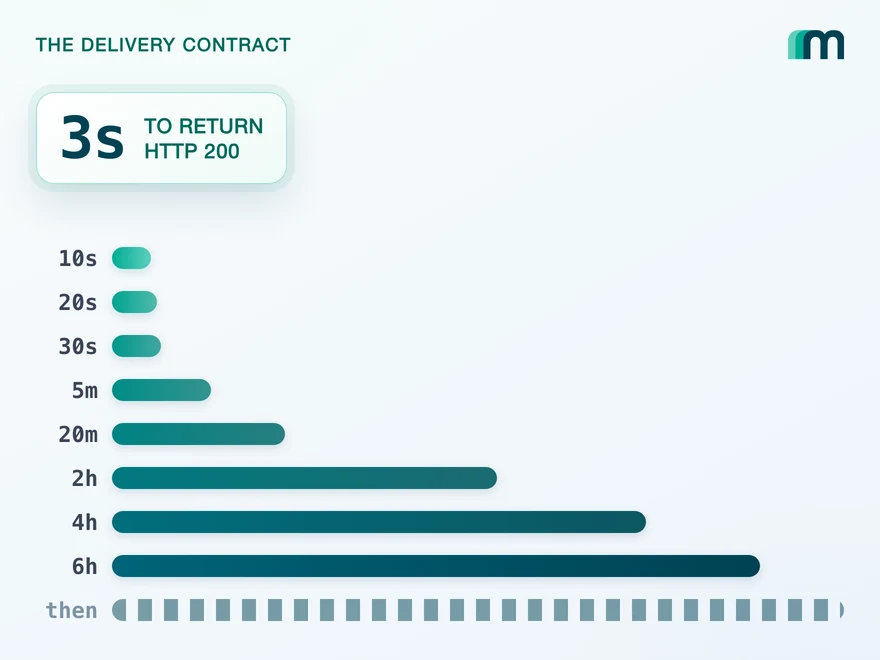
QuickBooks Online Webhooks: Events, Retries and Recovery
QuickBooks Online webhooks cover 29 entity types and expect HTTP 200 in three seconds. Why Intuit still asks you to poll change data capture.
Lennart Svensson · 25 Aug 2026Map once, cover every customer
See how the mapping step, raw data and dedicated endpoints fit any ERP configuration onto one data model, or walk through it on your own stack.