Sage Active API Integration
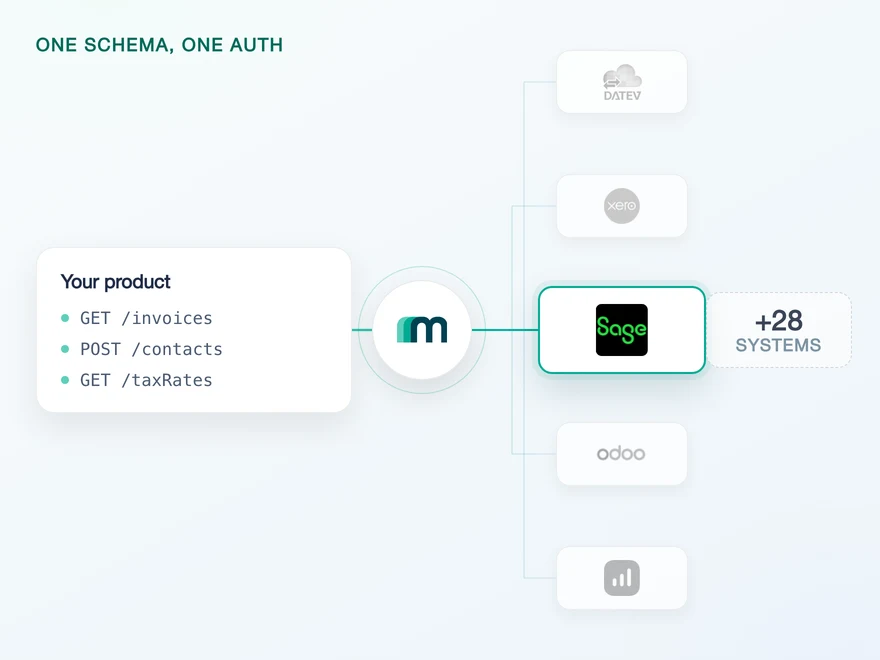
Sage Active is Sage's cloud accounting and ERP product for small and mid-sized businesses, sold in France, Spain and Germany. It carries invoicing, VAT, bank reconciliation and the ledger, and its API is GraphQL rather than REST. Connect it through Maesn and you reach it with the same REST calls and the same data model as every other supported system.












The Sage Active API speaks GraphQL, your code keeps REST
Three shapes of the Sage Active API land in your codebase on the first day, and none of them has anything to do with accounting.
Ordinary REST calls, put back in front
Sage Active exposes a single GraphQL endpoint where a query reads and a mutation writes, in the Hot Chocolate conventions Sage uses. It also enforces a complexity limit and rejects queries that exceed it, so a deeply nested read has to be split across several requests. Maesn builds and splits those operations in the background, and what your client sends is the same REST call it sends to every other system.
Chosen once, attached from then on
Sage Active refuses any call without an X-OrganizationId, the internal identifier of the company whose books you are touching. It is not known at the end of the OAuth flow: you have to fetch the list, let the customer pick and store the answer per tenant. Maesn runs that selection as part of the interactive authentication flow, stores the answer against the connection and puts the value on every later request.
Readable values, resolved underneath
Reference fields on a create take the numeric ID Sage Active uses internally. A unitOfMeasurementId will not accept KILOGRAM, and the same holds for tax codes, payment terms and account references. Those IDs are per tenant, so the lookup table is per customer too. Maesn fetches those tables, caches them and maps them, so what you post is the readable value and the mapping is not code you have to maintain.
What reaches your code is a REST call and an account key. GraphQL, the company header and the ID resolution stay on this side, and the system after Sage Active is a configuration step rather than a second project.
A short call is usually enough to tell whether Maesn fits your use case.
Paywise added accounting systems it never built
Paywise automates receivables for businesses whose customers all book somewhere different. The systems were never the product, and connecting them one at a time was the part that did not scale.
“Since integrating with Maesn, we've dramatically increased our platform adoption - supporting a wide range of accounting systems in one go. Our customers can connect their existing tools instantly, which drives engagement and makes Maesn a key part of our success strategy.”


Three reasons to reach the Sage Active API through Maesn
A direct Sage Active integration is three learning curves before the first feature: a query language, a per-tenant company context and a reference-data layer. All three are paid once here, and they do not come back with the next customer or the next country.
The query language stops here
Queries, mutations, Hot Chocolate conventions and the complexity limit are handled in the Maesn backend. Teams that already build REST accounting integrations keep the model they know, which is the difference between adding a system and learning a stack.
Depth you can verify
The read side here is wider than on a pure ledger system, because Sage Active carries the order side next to the books: offers, offer lines and sales orders all come back. Everything that reads can also be written, and what is not switched on today is available on request.
Three countries, one connection
Sage Active runs as a separate target system per market in France, Spain and Germany. You register one app, pick its country and connect through the same interface, so a second Sage Active market is a configuration step rather than a second integration.
A Sage Active listing is a conversation, not a form
Most providers stop at the API. Maesn does the technical enablement and the relationship, and on Sage the second one is what a listing depends on: getting listed runs through Sage's partner team by hand, including an assessment of whether your product fits their strategy, rather than through a self-serve submission form.
Technical enablement
One integration against the Unified API and one data model, identical to every other system Maesn supports. Your engineers meet the same interface here as they will for the next system.
Partnership support
Maesn is an official Sage partner and takes the listing conversation with you, from the fit assessment to the technical review, and stays behind the integration afterwards. The listing carries your product's name, not ours.
A concentrated audience
Sage publishes more than 2 million customers, and the marketplace is where a Sage customer looks for connected software. That is distribution to people who already use the system you just integrated.
A team decides, not a form
Sage's partner team assesses strategic fit before a listing goes up. That is slower than a submission form, and it is also why a Sage Active listing is not something every competitor has by default, which cuts in your favour once you are through it.
Three markets behind one listing
The same product is sold in France, Spain and Germany. A listing that lands is a listing in front of a customer base that spans all three, which is why the country choice at app registration is worth getting right early.
The integration runs under your product's name, and the listing is yours rather than ours. Maesn is the layer behind it.
We prepare the fit assessment and the technical review with you.
A Sage Active connection is a token plus a company
Sage Active authenticates with OAuth 2.0 against an app you register yourself, and the flow has a second half most systems here do not have. After consent the connection still does not know which company it is for, so all three Sage Active target systems sit on the interactive list in Maesn's authentication documentation: the customer picks a company on a selection page, the answer is stored, and every later request carries it.
- OAuth 2.0
- Your own app, registered per Sage Active country
One app for every customer in a market. Maesn holds the credentials, runs the company selection and refreshes the 8-hour token behind them.
- Your app credentials and the subscription key
- Client ID, client secret and the subscription primary key are submitted once and used for every connection you make in that market afterwards. Your code holds an account key per customer and nothing else.
- The company context and the token cycle
- The company the customer selected is stored against the connection and attached to every call. The access token behind it lasts 8 hours and is refreshed here, which is why offline_access is requested at the start rather than discovered at hour nine.
The sandbox documentation lists Sage Active as a system Maesn provides an environment for, which is the route here because Sage publishes no free one. That matters more on this system than elsewhere: the company selection, the scopes and the 8-hour refresh are all things you want to have seen working before a customer sees them.
- 1
Your customer starts in your product
You send them into the flow and Maesn opens Sage Active's consent screen. It carries your app's name, because the app is registered under your company, so the connection reads as yours rather than as a third party's.
- 2
They pick the company
Sage Active returns to Maesn, and the interactive flow shows the companies that customer can reach. The selection page can carry your colours. What comes out is the company identifier every later request needs.
- 3
You work with one account key
Maesn stores the connection and returns an account key. From there every request carries your Maesn API key plus that account key, the same two headers you already send for every other system in the catalogue.
Every system in the catalogue authenticates differently, and Sage Active is the case where consent is only the first half. Unified authentication is what makes that a one-time cost: the consent screen, the company selection, the refresh and the account key behave the same way here as they do for a system that needs nothing but a key, so the second integration inherits the work rather than repeating it.
Sage Active data stays fresh on one scheduled read
It runs without asking anyone, on the same filter and the same pagination as every other system you connect. Events on Sage Active are a question of enablement rather than a property of the system, so an event your product depends on is worth naming early.
Nothing. Every event column in the matrix is either a request or a blank, so a change inside a customer's company stays invisible until something goes and reads it. If a specific object's events would change your product, that is what the on demand column is for, and it is a conversation rather than a roadmap item.
One scheduled read, with the same filter and the same pagination you use for every other system. The change-detection code you point at Sage Active is the code you already wrote, aimed at a different account key, and the interval stays a product decision rather than a system limit.
Worth knowing before you size a backfill: Sage Active pages by cursor, which is the GraphQL norm and means there is no way to ask for page five. Reaching the five hundredth record means walking every page in front of it. Maesn exposes offset paging and does the walking, so your code stays on page and limit. What is worth planning for is the first full load, which takes longer here than on a system that pages by offset natively.
A system you have to read on a schedule is where the cost of a per-system integration shows up most plainly, and on Sage Active it shows up twice, because the reading itself is sequential. One way to filter and page is what turns a cursor walk into the same page and limit you use everywhere else. What you handle in the event model and what you pull on a schedule stay two paths, and on Sage Active today everything runs down the second one.
What a Sage Active integration needs on day one
What Sage Active asks for before the first call is an app of your own, and the app has a country on it. The rest is a short list, and the last item is the one teams discover late.
- A Sage Active account with a valid subscription
- The docs' entire prerequisite list is that one line. Application keys live under Settings in the account itself, so the developer surface is a permission on a paying account rather than a separate portal you sign up to.
- One app, and its country is chosen at registration
- Under Settings, Application keys and Apps you add an app with a name, a URL and a contact email, then pick the Sage Active type: DE, ES or FR. The callback URL follows that choice, one of https://api.maesn.dev/auth/callback/sage-active-de, -es or -fr. The type and the callback have to match the market your customer is in, so it is a decision rather than a detail.
- Three values, handed over once
- The Solutions page of your app shows a Client ID, a Client Secret and a Subscription primary key. All three go to your Maesn contact once rather than per customer, and from there the handshake that consumes them runs here.
- The scopes decide the direction, and the token lasts 8 hours
- RDSA grants read access and WDSA write access, so what a connection can do is fixed at the consent screen rather than at the call. Access tokens expire after 8 hours and a refresh token is only issued when offline_access is requested up front. Both are handled here, and both are worth knowing because they are what a direct build gets wrong first.
We walk through the app registration, the country choice and the scopes with you.
One shape for Sage Active, and for the system after it
Sage Active answers in GraphQL and wants internal IDs where a person would write a word. A shared shape is what keeps both of those out of the code you write.
A wide read side, and a report almost nobody has
11 objects read, which is the fourth widest of the 30+ systems connected here. Two of them are unusual rather than merely many: Sage Active is one of two systems that return a trial balance, and one of three that read offers and offer lines. The order side reads as well, which is Sage Active being an ERP rather than a bookkeeping product.
Five objects go in, and none of them can be changed
Accounts, customers, invoices, items and suppliers can be created, and all five can be read back, so every write here makes a round trip. What no object does today is update in place: 22 of those combinations are marked on demand rather than unavailable, so tell us which ones your use case needs before you design around a create-only model.
The report asks for a date this system will not give you
The trial balance is the finished report the API offers, and it requires a fiscalYearStartDate on every call. Sage Active does not return fiscal years at all, so that date has to come from your product or from the customer. It is a small thing to plan for and an expensive one to discover on the day the report is due, with the customer already waiting for it.
Whatever you read comes back in the shared common data model, and on Sage Active that model does two jobs at once: it hides the GraphQL shape of the response, and it lets a write carry a readable value where the API wants an internal ID.
The read side is wide for an accounting connection because Sage Active is not only an accounting product. Offers, offer lines and sales orders read here and on very few others, which is the order side of an ERP sitting next to the ledger. That breadth is also what a published customer went looking for: Clockin's study names Sage among the systems its customers run, and gives the variety of those systems as the reason building the integrations in-house was never realistic. Their case study is that argument in a customer's words rather than in a table.
Tell us which objects your use case needs and we will confirm what is possible.