
How to integrate with Visma eAccounting: Three brand names, sixty-minute tokens and fifty-record pages
Visma eAccounting is sold as eAccounting in Norway and the Netherlands and as Spiris in Sweden, and the vendor's developer portal has already moved to the new name. The interface has not: every scope, host and path still says ea. What the split costs you is three support addresses on two domains.

Three brand names, and one target system underneath
The first question on this system is a naming one rather than a technical one: which product are you actually looking at. The same software is sold under a different name in each of its markets, and the documentation is in the middle of changing which name it uses.
Maesn’s integration documentation answers it in one line, directly under the target system identifier: “Note that the system is known under the brand name eAccounting in the Netherlands and Norway and as Spiris (used to be called SPCS) in Sweden.”
The vendor has gone further than that. Its developer documentation is now titled Spiris/eAccounting, the client id you receive is described as “provided to you upon registration for the Spiris Partner Programme”, the product is written as Bookkeeping & Invoicing/eAccounting throughout, and Swedish partners are answered at an address on the Spiris domain.
What has not moved is everything you type. The scopes are ea:api, ea:sales, ea:accounting and ea:purchase, the host is eaccountingapi.vismaonline.com, the paths are /v2/…, and the target system through Maesn is vismaeaccounting. A rename above the interface and a stable one below it is the useful way to hold this system in your head.
Which objects that connection can reach today, and which sit on request, is listed object by object on the Visma eAccounting API page. It is narrower than the market coverage suggests.
- Sweden
- Spiris
- Used to be called SPCS
- Norway
- eAccounting
- Trial link is the .no domain
- Netherlands
- eAccounting
- Own partner address
- TARGET_SYSTEM: vismaeaccounting
- ea:api
- eaccountingapi.vismaonline.com
The naming is a sales problem, not a build problem. A connection written for a Norwegian customer already reaches a Swedish one. What does differ per market is the sandbox, and there you need one account each.
The brand-name sentence and the target system identifier from the connect guide. Programme name, product naming and the support addresses from Visma’s developer start page, checked 14 August 2026.
One interface, three markets and three separate partner contacts
Three markets on one interface is the commercial argument for this system, and it holds. What it does not tell you is that the markets are run separately underneath, and that shows up the first time you need a partner contact.
The vendor’s own support structure reflects the split, and it is the clearest signal of how separate these markets are underneath one interface:
| Market | Brand | Partner support |
|---|---|---|
| Sweden | Spiris | Own address, own domain |
| Norway | eAccounting | Own address, Visma domain |
| Netherlands | eAccounting | Own address, Visma domain |
Three separate contacts on two domains for one interface. Read that as a planning input rather than as a verdict: it tells you which door to knock on per market, and that the door is not the same one.
The wider pattern belongs to the group rather than to the product. Visma acquires software and keeps it running under its own name, which is why one vendor logo across a pitch deck can still mean four unrelated integrations underneath.
Support addresses and the market list from Visma’s developer start page, checked 14 August 2026. The sandbox regions from its sandbox FAQ.
Scopes are agreed before your first customer connects
Authentication is OAuth 2.0 with the authorisation code flow, which makes it the familiar half of this system. The unfamiliar half is that the scope list is decided twice, and the second time is in every authorisation request you send.
Two scopes are mandatory. ea:api grants access to the interface at all, and offline_access is what makes a refresh token come back. Everything else is per resource area, each with a read-only variant, which means the boundary of what your integration can ever reach is drawn before your first customer sees a consent screen.
| Scope | Access | Reaches |
|---|---|---|
ea:api | Required | The interface itself |
offline_access | Required | A refresh token |
ea:sales | Optional | Sales resources, full |
ea:sales_readonly | Optional | Sales resources, read |
ea:accounting | Optional | Accounting resources, full |
ea:purchase | Optional | Purchase resources, full |
Both ea:accounting and ea:purchase have _readonly variants as well, on the same pattern as sales. And one scope belongs to a different product: vls:api reaches Visma’s payroll interface, which shares the identity server, so one token can serve both as long as the scopes were authorised.
Two request parameters are recommended by the vendor in unusually strong terms, and both exist to stop the flow from connecting the wrong company:
prompt=select_accountforces the company selection instead of reusing the one already chosen in Visma Online. The documentation calls it “highly recommended” and says omitting it “may result in automatic or unpredictable logins with an already selected company”.acr_valuesfilters the selector down to companies that actually have access to this product, which keeps a customer from picking an unrelated Visma subscription.
GET https://identity.vismaonline.com/connect/authorize?client_id=<client_id>&redirect_uri=<redirect_uri>&scope=ea:api%20offline_access%20ea:sales&state=<state>&response_type=code&prompt=select_account&acr_values=service:44643EB1-...# the code is single use and valid for 5 minutes.# fragments (#) are not allowed in redirect_uri.
Multiple scopes are separated by %20 or +. The token exchange authenticates with Basic base64(client_id:client_secret) rather than with a body field.
The practical consequence of declaring scopes up front is a product question rather than an engineering one. Widening them later means going back to every connected customer for a fresh approval, so what your product might need in a year belongs in the conversation before the first customer connects.
Through Maesn the scope set is submitted once with the credentials and applied to every authorisation request, which is the same shape unified authentication gives every other system.
Scope table, the two parameters, the five-minute code lifetime, the fragment restriction and the shared identity server from Visma’s authentication guide, checked 14 August 2026. The acr_values identifier is abbreviated here; the full value is on that page.
Sixty minutes, two years and a password change
Three numbers describe the whole token lifecycle here, and the third one is the reason integrations on this system stop working without anybody deploying anything.
The access token expires 60 minutes after it is issued, which the token response states as expires_in: 3600. Refreshing is the same call with grant_type=refresh_token, and the response has the identical shape, so a refresh returns a new refresh token alongside the new access token.
The refresh token itself is valid for two years from issue. Then comes the exception, in the vendor’s words: “The refresh token remains valid for two years from the date it is issued. However, please be aware that if the user changes their password, the refresh token will become invalid.”
Two things follow, and the second is where the cost sits. A password change is an ordinary event in a small business, so this is a normal state rather than an edge case. And the documentation describes no notification for it, so the first signal your code receives is a 401 on the next call, at whatever hour your scheduler happens to run.
That makes re-authorisation a product surface rather than an error handler. Something in your interface has to be able to say this connection needs reconnecting to the right customer, which is exactly the state one error model exists to surface consistently instead of once per vendor.
| Token | Valid for | Ends early when |
|---|---|---|
| Access token | 60 minutes | nothing else needed |
| Refresh token | Two years from issue | the user changes their password |
| Authorisation code | 5 minutes, single use | it is exchanged once |
There is also a revocation endpoint, which is the polite way to end a connection from your side: POST /connect/revocation with the token and an optional token_type_hint, authenticated the same way as the token exchange. A successful call returns 200 with an empty body.
Token lifetimes, the password-change exception, the refresh call and the revocation endpoint from Visma’s authentication guide, checked 14 August 2026. That page documents no notification mechanism for the invalidation, which is a gap in the documentation rather than a statement that none exists.
Fifty records by default, and the response counts the rest
Collection endpoints return 50 objects per page unless you ask for more, and the maximum is 1.000. You raise it with $pagesize and move through pages with $page, or you follow the Link response header, which carries the next page and the last page.
The part that decides whether a sync is correct is the envelope. A paginated response is not a bare array: it is a Meta object and a Data array, and Meta reports how much there is in total.
{"Meta": {"CurrentPage": 1,"PageSize": 50,"TotalNumberOfPages": 22,"TotalNumberOfResults": 1100,"ServerTimeUtc": "2018-03-05T15:14:04Z"},"Data": [ ... ]}
Fifty records in hand and 1.100 in the collection, stated in the same response. A sync that stops here is a client that did not read Meta.
- CurrentPage
- 1
- PageSize
- 50
- TotalNumberOfPages
- 22
- TotalNumberOfResults
- 1.100
- ServerTimeUtc
- timestamp
The first response already tells you it is one of twenty-two. A sync that stops here returns 50 of 1.100 records and a 200, and the two fields that would have caught it were in the payload all along.
Filtering is the other half of a scheduled read, and it is oData v4 with a $filter parameter rather than a bespoke syntax. The operators are the ordinary set, strings are matched case insensitively and have to be quoted, and dates take a fixed format.
For a delta sync the field that matters is ChangedUtc, and the vendor documents it as the example of a datetime filter, which makes it the natural pair to the paging above: ask what moved, then walk the pages until CurrentPage reaches TotalNumberOfPages.
GET /v2/articles?$filter=ChangedUtc gt 2026-08-01T00:00:00.00Z&$page=1&$pagesize=1000# operators: gt lt ge le eq ne# startswith() endswith() contains() length()# helpers: year() month() day() hour() minute() second()# strings are single quoted, numbers are not.
Combine predicates with and and or. The documented datetime format is yyyy-MM-ddTHH-mm-ss-FFZ.
Through Maesn both halves arrive in the shape every other connected system uses, which is what one way to filter and page means in practice: the same query against a system that pages by cursor, by page number or by fifty records at a time.
Page sizes, the Link header, the Meta fields and the example numbers from Visma’s pagination guide. Operators, the datetime format and ChangedUtc from its filtering guide. Both checked 14 August 2026.
Six hundred requests a minute, counted per endpoint
The rate limit is one number with an unusual unit: 600 requests per minute, and “limit is registered per client and endpoint/URL”.
Per endpoint changes how a backfill behaves. A worker reading customers, suppliers and articles does not share one budget across the three, so parallelising across resources buys throughput that parallelising within one resource does not. It also means a single hot endpoint can be throttled while the rest of your integration is unaffected, which is harder to spot in a log than a global limit.
Exceeding it returns 429 with a body that names the window and the wait in plain language, which is more than most systems offer:
HTTP/1.1 429 Too Many Requests{"ErrorCode": 4010,"DeveloperErrorMessage": "API calls quota exceeded! maximumadmitted 600 per Minute. Try again in 55 seconds.","ErrorId": "3fa7da17-eeb2-48f6-997d-0be158f4cba4"}
Every unsuccessful request carries an ErrorId, and the vendor asks for it plus your client id when you contact support. The client secret is never part of that conversation.
It is worth comparing this to the other Visma product in the catalogue, because the two meter on axes that have nothing in common. The Visma e-conomic API runs a token bucket per customer agreement in which different endpoints cost different amounts, so its budget depends on which calls you make. This one counts calls flatly, and splits the count per endpoint.
One vendor, two products, two models and no shared vocabulary between them. That is the normal case in this group rather than an accident of two acquisitions, and it is the reason a pacing strategy is worth writing once at a layer above.
The limit, its unit and the 429 body from Visma’s rate limits guide, checked 14 August 2026. The error id convention from its developer start page.
One company per email, on the same URL as production
Testing this system has two properties that are easy to miss and expensive to discover late. The first is that the sandbox is not a separate address.
In the vendor’s words: “It’s the same URL’s as production but with a IdentityServer client and Visma Online account that has a specific Sandbox type.” Nothing in a base URL or a hostname tells you which environment you are talking to. Only the credential does.
The two directions are not symmetric either: a production client id can reach a sandbox company, while a sandbox client id can never reach a production one.
The second is scale. A sandbox company is tied to one region at creation, the region cannot be changed afterwards, and “you can have a maximum of 1 company per email address”. Testing a second market therefore means registering a second account under a different email address. The vendor notes it is working on lifting that, which makes it a current limitation rather than a design.
| Property | State |
|---|---|
| Region | Chosen at creation, cannot be changed |
| Companies per email address | One |
| Regions available | Sweden, Norway, Finland, the Netherlands |
| Sample data | Region specific, or add your own |
| Reset | Archives everything except the company name |
| Internal services | Payslip, AutoPay, AutoReport and AutoInvoice are mocked or absent |
That last row deserves a sentence, because the vendor is candid about the consequence: since some internal integrations are mocked, “you might encounter some weird errors if you try to access these services”. A failure in the sandbox is therefore not automatically a failure in your code.
Two steps in this flow are also not self-service, and both belong in a plan rather than in a launch week. Going live requires contacting Visma’s API support for production access. And the callback URL is set by the vendor rather than by you: Maesn’s documentation says plainly that “you have to contact Visma to change the URL to the correct one”.
What Maesn changes here is the sandbox itself rather than the paperwork. Our sandbox overview lists this system as having a free trial and as being provided by Maesn, so a test environment is available without registering four Visma accounts of your own. The four regions still exist; they just stop being four registration projects.
The shared URLs and the mocked services from Visma’s environments page, the one-company rule, the region lock, the reset behaviour and the client id asymmetry from its sandbox FAQ, production access from its start page, all checked 14 August 2026. The callback step from the connect guide and the sandbox availability from the sandbox overview.
What Maesn takes off the list, and what stays with you
Everything above describes what the system does. This is the split: the parts that stop at this layer, and the decisions that stay yours because only you know your product.
What Maesn takes off the list:
- The scope declaration and the two parameters. Submitted once with your credentials and applied to every authorisation request.
- The refresh, per tenant. Tokens are refreshed on this side, so the lifecycle is not something your product schedules or stores per customer.
- Paging every collection. The envelope is read for you, so what arrives is the complete set rather than the first fifty.
- Three brand names reduced to one connection. Whichever name the customer uses, your code addresses one target system, mapped into one shared data model with every other system.
What stays with you:
- The scope decision. What your product might need in a year is cheaper to request now than after every customer has consented.
- The polling interval. How fresh your product needs to be is your choice, and you have 600 requests a minute per endpoint to spend on it.
- Which objects you need enabled. Name them from your use case, and have that conversation before a customer commitment instead of after one.
Frequently asked questions
Do I need a separate integration for Spiris?
Which scopes does Visma eAccounting need?
How long do Visma eAccounting tokens last?
Why does my Visma eAccounting request return only 50 records?
What are the Visma eAccounting rate limits?
Can I test every Visma eAccounting market with one Visma account?
How to Integrate with Tripletex: One Session Token to Send
Tripletex combines two tokens into a third, puts the company in the username field and numbers new journal lines by row. What that means when you build.
Lennart Svensson · 24 Sept 2026
How to Integrate with Procountor: Run It Unattended
Procountor has two ways in, and the unattended one stops at every endpoint that asks for a second factor. What that means for tokens, syncing and tax mapping.
Lennart Svensson · 28 Aug 2026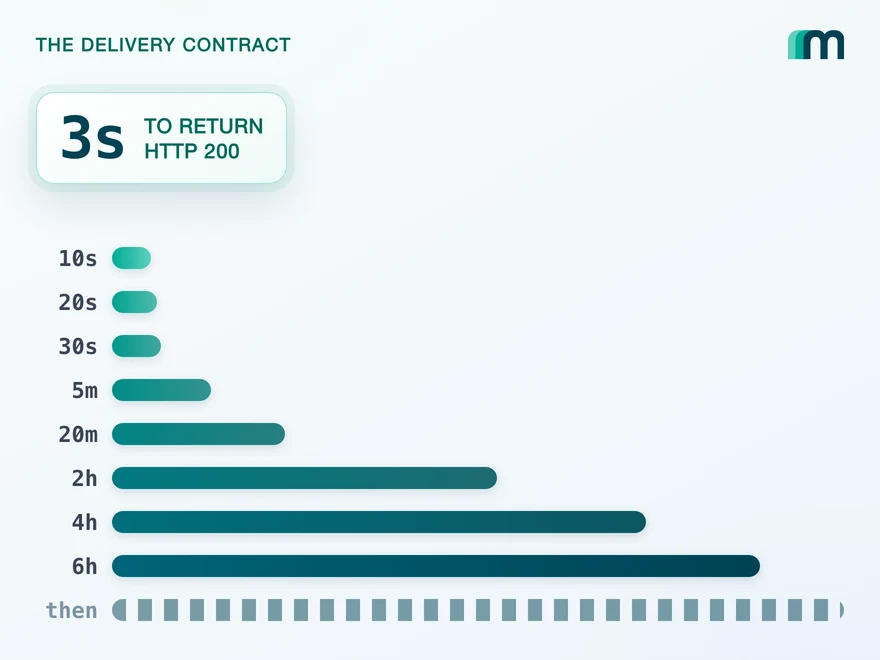
QuickBooks Online Webhooks: Events, Retries and Recovery
QuickBooks Online webhooks cover 29 entity types and expect HTTP 200 in three seconds. Why Intuit still asks you to poll change data capture.
Lennart Svensson · 25 Aug 2026Build once on the Unified API.
Visma eAccounting counts 600 requests a minute per endpoint and calls itself three things, Visma e-conomic prices every call and refills per agreement, and both belong to the same vendor. Build against one interface and each of those becomes a row in a table rather than a project.