
How to integrate with Holded: Two counters and two statuses
Holded is an easy interface to call: a key in one header, one path per resource, a cursor to walk. What costs time is that two of its answers look complete and are not. Two invoice statuses both mean unpaid, two date parameters answer different questions and two rate counters share a single 429.

Nothing calls you, so your numbers come from a query you wrote
Holded has a full event system and you cannot use it through us yet. That single fact decides the shape of the integration, because it moves the whole question of freshness into code you own: what you know about a customer’s books is what your last read asked for.
Both halves are documented. Holded publishes 18 event groups and 58 events, from invoice.create to stock.update, each delivery signed with an HMAC-SHA256 digest over the raw body and retried with exponential backoff until your endpoint answers with a 2xx.
One header already tells you how they expect it to be handled: x-holded-webhook-id is described as a “Unique event identifier; use it as an idempotency key”.
Through Maesn, no Holded object carries an enabled event today, and 26 object and operation combinations are marked as available on request. Why the gap exists is not something any source of ours states, so this article does not guess at it. What is switched on object by object, and what one of those requests involves, sits on the Holded API page.
Event groups, headers and the retry contract from Holded’s webhook documentation, read from its own event overview, checked 14 August 2026. Enabled operations read from our per-system coverage data on 17 August 2026.
There is a second reason to take the schedule seriously, and it comes from Holded rather than from us. Its rate limit page lists six practices for integrators, and one of them is “No hagas polling. Suscríbete a webhooks y recibe actualizaciones en tiempo real sin consumir tu cuota”: do not poll, subscribe to webhooks and receive updates in real time without spending your quota.
The mechanism the vendor recommends for protecting the budget is the one that is not available to you here, and a schedule has to account for that.
So the loop is a delta read, and our own guidance for it is narrow. Store the timestamp of your last successful fetch, pass it back as lastModified on the next call and “poll with the lowest viable frequency”, taking both our rate limits and the target system’s into account.
On Holded that second half is the expensive one, which is what the last section of this article is about.
GET /contacts?lastModified=2026-08-17T04:00:00&limit=200&page=1X-API-KEY: <your maesn api key>X-ACCOUNT-KEY: <the account key for this customer># Only records new or changed since that timestamp come back.# page starts at 1. Store the fetch time, not the newest record.
Parameter, headers and the wording “poll with the lowest viable frequency” from our guide on keeping data fresh. Storing the fetch time rather than the newest record you saw is what keeps a slow write from falling between two runs.
What that loop reads today is the party layer. Contacts, customers and suppliers are the three objects Maesn has switched on for Holded, and the same three go in the other direction as well, so a company that arrives here can also be corrected here.
That is a narrow integration rather than a small one: keeping customer and supplier records in step is the problem two systems argue about most, because each of them believes it owns the company it is describing.
Everything with an amount on it, invoices included, is a request rather than a switch you flip yourself. That matters for every section below in a specific way: the reading rules there are Holded’s own, they decide what a report is allowed to claim and which of them your product ever meets depends on which objects you ask for.
One structural note before the detail. What arrives through the event model and what you fetch on a schedule are separate paths in the Unified API, and a system with nothing enabled puts all of the weight on the second. Nothing below is a workaround for that. It is what reading a system properly looks like when reading is the only channel you have.
Pending and partial are both money you are owed
The obvious query for outstanding receivables returns a number that is too small. status=pending selects invoices with no payment recorded at all, so every invoice that has been partly collected sits outside the result and still owes the remainder.
This is not an edge case somebody found the hard way. Holded writes it into the description of the endpoint, in capitals, and then again into the description of the parameter:
“IMPORTANT — outstanding receivables (‘pendiente de cobro’): status=pending matches ONLY invoices with no payment recorded; partially collected invoices are status=partial and still owe money. To count or sum what is outstanding, query BOTH statuses (pending and partial) and sum payments_pending — a status=pending query alone undercounts.”
Six status values are documented in total. Two of them mean money is still owed, one is a view across those two and the remaining three are not described as outstanding at all.
- status=pending
- No payment recorded
- The whole amount is still open, and this is the filter most integrations reach for first.
- status=partial
- Partly collected, still owes
- A payment exists and the rest does not. Left out of a pending query, and invisible in its total.
- status=overdue
- A filter across both
- Documented as pending or partial with a due date that has passed, so it is a view of the two above rather than a state of its own.
- completed · cancelled · failed
- The remaining three values the reference lists. It does not describe any of them as outstanding, so none of them belongs in a receivables total.
The amount is already in the list response. Every row carries payments_total and payments_pending, so the correct total is two filtered reads and a sum rather than one call per invoice.
Status semantics, the enumerated values and the two summary fields from Holded’s list invoices reference, checked 14 August 2026.
Holded says plainly why those two fields sit on the list response: “so you can display outstanding balances without fetching each invoice individually”. Without them the same total is a detail call per open document.
On an account that meters a monthly quota, that is the difference between a receivables view you can refresh on a schedule and one that spends your customer’s budget every time somebody opens it.
status=overdue is the filter that spans both of them, which makes it a report rather than a state. An invoice never moves from partial to overdue, it qualifies for both descriptions at once, so dunning logic built as a state machine has its first bug exactly there.
There is a second layer to all of this, and it belongs here rather than in a footnote. Our unified status filter for invoice reads is documented for nine connected systems and Holded is not among them, and the invoice objects themselves are marked on request for Holded rather than switched on.
So the first question in an accounts receivable build is whether the objects your report needs are configured for this connection at all, which is a conversation with us before it is a parameter.
The nine systems with a documented status filter are listed on our filtering, ordering and pagination page. That is a statement about our documentation rather than about a capability. Absence of documentation is not proof that a feature is absent, which is why the sentence above names the list and not a limit.
Issue date and due date are two different filters
A Holded invoice carries two dates and each has its own pair of parameters. start_date and end_date filter by the issue date, due_date_start and due_date_end filter by the due date and all four are optional.
The consequence is easy to state and easy to get wrong: what came in last month and what falls due next month are two different queries against the same endpoint, and neither one answers the other. A cash view built on the issue date will look plausible for months and be wrong every time a payment term is longer than the reporting period.
The default deserves attention too, because Holded is explicit about it: “all are optional and unfiltered means the whole account”. Forget a date parameter and the response is every invoice the tenant has ever issued, which on a metered account is an expensive way to find a bug.
Two smaller details from the same reference matter in practice. Dates accept RFC 3339 with an offset or a plain calendar date, so 2026-01-01 and 2026-01-01T00:00:00+00:00 are both valid.
That is not the only format Holded publishes, and it is the first thing to check before you write a date helper. The Academy article that explains how to generate a key states flatly that “Dates must be sent in Unix timestamp format”. Two vendor pages, two formats.
The likely reason is that Holded has two generations of its interface in circulation. The reference quoted above documents the current one, and the same Academy article points customers at a separate route for keys to the older one. Send what the endpoint you are actually calling documents, and do not carry a date helper from one generation to the other.
And approval is a filter rather than a status. approval_status takes draft for unapproved documents and approved for approved ones, so a read that does not pass it is not restricted to approved documents.
Sorting is documented as a fixed set as well, with a leading minus for descending order: date, dueDate and total, each in both directions. Useful when you want the newest page first on a resumed run, and a reminder that the order of a result set here is something you ask for rather than something you inherit.
Date parameters, the unfiltered default, the accepted formats, approval_status and the sort values from Holded’s list invoices reference, checked 14 August 2026. The Unix timestamp requirement and the separate route for older keys from its Academy article on generating a key, checked 17 August 2026. Both quoted rather than reconciled.
A Spanish chart of accounts is a filter value
One filter on the invoice list is Spanish accounting practice made into a parameter. accounting_account_num selects invoices with at least one line booked to a given account, and it identifies that account by its numeric code from the Plan General de Contabilidad.
Holded documents both failure modes, and they say different things. A value that is not a number comes back as 400 with the message that the parameter “must be a positive integer (PGC code)”. A number that no accounting account in that tenant carries comes back as 404, not as an empty list.
The first is a bug in your request, the second is a fact about your customer’s chart of accounts, and a client that treats both alike will hide a mapping error until somebody reconciles by hand.
The reference gives the example 70000000 for “Ventas de mercaderias”, and it notes that an account name is resolved to its code only when the call arrives through Holded’s own assistant. Your integration passes the code.
So a Spanish chart of accounts becomes part of your configuration surface, per tenant, and it is the kind of mapping that is cheap to store at onboarding and expensive to reconstruct later.
Tax lands in the same category. Holded groups tax types with products and contacts as reference data that changes rarely and should be cached locally, and our own coverage lists Tax rates for Holded as an object in its own right, marked as available on request. A rate here is a record you resolve and hold, not a percentage you put on a line and forget.
The PGC filter, its 400 and its 404 from Holded’s list invoices reference, the caching advice for tax types from its rate limit page, both checked 14 August 2026. Object states read from our per-system coverage data on 17 August 2026.
Fifty rows a page, and has_more ends the loop
Holded pages with a cursor rather than with offsets. A list response carries a cursor value and a has_more boolean, and you pass the cursor back to fetch the following page. The cursor is documented as opaque and as “Null on the last page”.
Two things follow. The end of the walk has a documented signal, so the loop terminates on has_more and on the null cursor rather than on the size of what came back. And because the cursor is opaque, it is a position in a result set and not a filter you can reconstruct, so a resumed run has to keep the cursor it was given or start the query again.
The page size is where the cost of a first full read is decided. limit defaults to 50 and takes 200 at most, and on an account with a monthly call budget the default is the expensive choice for a backfill. It is also the one you get by not passing anything.
Through Maesn the same walk is shorter, and that is the point of a unified interface: you do not write cursor handling at all. Reads take limit and page, and one way to filter and page covers every connected system, so the loop you write for Holded is the loop you already wrote for the system before it.
One detail catches people out: page starts at 1, not at 0.
Cursor semantics, the null cursor and the default and maximum page size from Holded’s list invoices reference, checked 14 August 2026. The unified parameters and the detail that pages count from 1 from our own filtering and pagination page.
Two counters, and the 429 says which one you hit
Holded runs two rate counters in parallel and both belong to the account rather than to your application. One is a per-minute burst guard, the other a monthly call quota, and in the vendor’s own words “El primero que se llena es el que devuelve 429”: whichever fills first is the one that answers 429.
The account-level scope has a consequence people try to engineer around exactly once: “Todas las claves API de la misma cuenta comparten los mismos contadores, así que añadir más claves no aumentará tu presupuesto”. All keys on one account share both counters, so a second key buys no extra room. The documented way to more room is a higher plan.
The quota scales with the plan your customer pays for, which means the ceiling on your sync is a commercial fact about them rather than a technical one about you.
It is a fact they can look up. Holded documents an API Usage screen in the same Developers section where the token is created, showing “the calls made and the limit you have on your account”. So the question of how close a sync runs to the ceiling has an answer your customer can read out, which is a better basis for an interval than a guess on either side.
| Plan | Requests a minute | Calls a month |
|---|---|---|
| Plus | 60 | 500 |
| Basic | 60 | 2.000 |
| Standard | 120 | 7.500 |
| Advanced | 120 | 30.000 |
| Premium | 600 | 100.000 plus billed overage |
Table reproduced from Holded’s rate limit page, checked 14 August 2026. The plan names and their order are the vendor’s own. Lower plans return 429 once the monthly quota is reached, while Premium bills the excess automatically.
What the response tells you matters more here than the numbers do. A 429 carries Retry-After in seconds and the usual X-RateLimit-Limit, X-RateLimit-Remaining and X-RateLimit-Reset.
One more header is easy to miss and does the real work: X-RateLimit-Window, whose value is minute or month. It tells you whether waiting will help. On minute it will: honour Retry-After, and the next window clears the block by itself. On month it will not, because the quota that is exhausted is the account’s monthly budget, so the answer is a larger plan or fewer calls rather than a longer sleep. Two 429s with the same body mean two different things, and this header is what separates them.
HTTP/1.1 429 Too Many RequestsRetry-After: 60X-RateLimit-Limit: 1500X-RateLimit-Remaining: 0X-RateLimit-Reset: 1715692800X-RateLimit-Window: minute{ "type": "https://api.holded.com/problems/rate-limit","title": "Rate limit exceeded", "status": 429,"detail": "You have reached the per-minute limit ..." }
Header set and body shape from Holded’s rate limit page, checked 14 August 2026. The values are the vendor’s own example. Errors across the interface use this same problem format, with type, title, status and detail.
Catches short spikes, so the platform stays responsive when an integration misbehaves.
Documented as always the safest path, and the window resets on its own.
The total call budget of the plan your customer is on, not of your application.
Lower plans return 429 once the monthly quota is reached. Premium bills the excess.
Every response carries the remaining budget. Holded asks integrators to read X-RateLimit-Remaining on each response and slow down before it runs out, which is cheaper than finding either ceiling by hitting it.
Waiting Retry-After seconds and trying again is right for the burst window and useless for the monthly one, because a month does not clear in sixty seconds. A client that treats every 429 the same way will either sleep through the rest of the billing period or hammer a quota that cannot recover.
The useful behaviour is one branch: on minute, back off and continue. On month, stop the schedule for that customer and raise it as an account matter, because the fix is a plan and not a delay.
There is a reason this section describes headers instead of naming a per-minute ceiling: Holded documents that ceiling twice and the two do not agree.
Its rate limit page gives 60 to 600 requests a minute depending on the plan and applies them per account; its error page states “La API permite 100 peticiones por minuto por clave API”, so 100 a minute and per key. Different number and different model.
The example response on the rate limit page then carries a third figure again, which is the value in the snippet above.
The monthly quota, by contrast, appears once and is contradicted nowhere, so it is the number a schedule can be sized against. Everything to do with the minute window belongs in code that paces against the headers, rather than in a constant somebody has to keep in step with a vendor page.
And when the call is refused rather than throttled, the four codes mean four different things. A 401 means the key is missing or invalid, a 403 means the key is valid and lacks the permission for that endpoint, a 400 means the request itself is malformed and a 422 means the JSON was valid and failed semantic validation.
Through us those arrive in one error contract rather than as a Holded-shaped branch next to a branch for every other system.
Per-minute figures from Holded’s rate limit page and its error handling page, both checked 14 August 2026 and both quoted rather than reconciled. Status code meanings from the same error page.
What Maesn covers, and what stays with you
A unified interface absorbs most of what the sections above describe. What it cannot absorb are the four decisions below, and every one of them is cheap to make early and expensive to revisit.
What the connection takes off your desk:
- The key, held per tenant. Holded shows an API key once, and unified authentication covers the collection, the storage and the branded entry page for every system rather than once per system.
- One shape for parties. Contacts, customers and suppliers arrive in the same common data model as every other connected system, so a supplier from Holded maps exactly like a supplier from anywhere else.
- One paging and filtering model. Cursors, opaque tokens and the 50-row default stay behind the interface, and your loop uses the same two parameters it uses everywhere.
- One error contract. The 403 on a missing scope and the 429 on either counter arrive in the shape you already handle.
- An environment to build in. Holded offers a free trial you can register yourself, and we provide a sandbox with test data on request.
What stays with you:
- The polling frequency, and its budget. The quota belongs to your customer’s plan. How fresh your product needs their data to be is a decision only you can make, and on this system it has a price tag attached.
- Which objects the connection needs. Three are enabled and the rest is switched on when a use case needs it. Raising that before you scope the work is a conversation; raising it afterwards is a replan.
- The Spanish specifics you cache. Chart of account codes and tax records are per tenant, and where they land in your data model is your design.
- What a 429 on the monthly window means for your product. Pausing a sync, warning the customer or asking them to upgrade is a product decision, not an integration detail.
- The plan, and who creates the token. Holded puts the interface on all paid plans and “not available on the Free plan”, and creating a token needs Developers-section access, which a custom role can carry rather than only an owner. Its permissions are chosen at creation rather than inherited from the person.
Three enabled objects reads like a thin connection, and the shape says more than the count does. The same three are readable, creatable and updatable, so the party layer has a full round trip, and the rest of the object list is marked “On demand - contact us” rather than unavailable.
Eleven objects stand at not supported in all five operations, and one of them decides whether a whole feature is possible at all: Journal entries. If your product posts bookings, that belongs in the first conversation rather than in the second sprint.
Object states and the three state labels read from our per-system coverage data on 17 August 2026, with the labels quoted from the legend on our Holded integration notes. Key handling and the trial from Holded’s authentication page, checked 14 August 2026.
The plan requirement, the Developers-section access and the note that a token does not inherit a user’s role from Holded’s Academy article on generating a key, checked 17 August 2026.
Frequently asked questions
Why is my Holded outstanding total lower than the ledger?
Which date does a Holded invoice filter use?
What does a 429 from Holded mean for my sync?
How many records does one Holded page return?
Why does my accounting account filter return 400?
How do I detect changes in Holded without an event?
Which Holded plan do I need, and who can create the token?
What is the difference between a 400 and a 422 here?
How to Integrate with Tripletex: One Session Token to Send
Tripletex combines two tokens into a third, puts the company in the username field and numbers new journal lines by row. What that means when you build.
Lennart Svensson · 24 Sept 2026
How to Integrate with Procountor: Run It Unattended
Procountor has two ways in, and the unattended one stops at every endpoint that asks for a second factor. What that means for tokens, syncing and tax mapping.
Lennart Svensson · 28 Aug 2026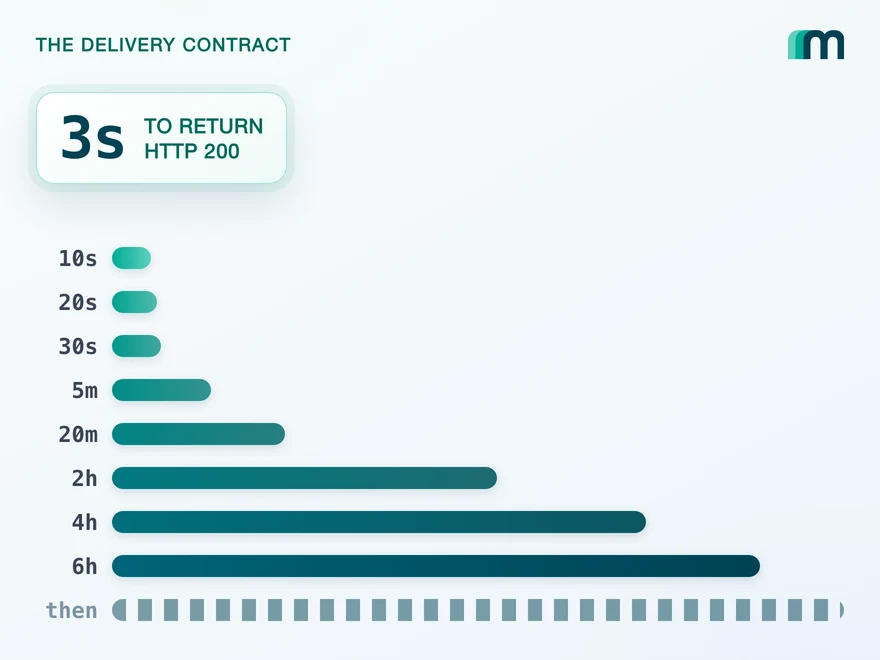
QuickBooks Online Webhooks: Events, Retries and Recovery
QuickBooks Online webhooks cover 29 entity types and expect HTTP 200 in three seconds. Why Intuit still asks you to poll change data capture.
Lennart Svensson · 25 Aug 2026Build once on the Unified API.
A status filter that undercounts, two date axes, an opaque cursor and two counters behind one 429 are each an afternoon of somebody's time on Holded alone. Build against one interface and the next system costs a configuration step instead.